Hi all,
While Reading Readiness Document for NAV 2015 i came across some new UI Changes in NAV 2015. Let's see what document says in the article.
What Benefits These Changes Should Bring (AS per Microsoft) -
1. Easier page overview and processing -
By indicating which fields on a page are mandatory, users get a better overview of their process, especially users that do not use the page frequently.

2. Faster processing
By auto-filling and hiding No. fields on documents the user can now process documents faster, when that document type has a unique number series. Data entry work becomes faster because some fields can be skipped.

3. Easy check if document is correct
With totals displayed directly on sales and purchase documents, it is now very easy to check if the document lines have been filled as expected. For purchase invoices, this also makes it easier to check totals and VAT amounts.

4. Simpler pages
With the new capabilities to remove UI elements that are not in either the license or in the user’s permission, the individual pages can now be reduced to show only what is really relevant for the user. All UI elements that the user does not need can be removed from the user interface.

5. Simplified and Enriched Sales Invoice Experience
Option to Correct / Cancel a Posted Sales Invoice with one Click.

6. Create Customer and Vendor Cards on the Fly.
While Creating a Sales Document for a Non Existance Customer, system will not prompt for Error in NAV 2015 but a window as shown below will appear.

When you select Yes you now will have option to create new Customer Based on Templates already setup in system as per your business.

The Customer will get all the mandatory values from the Template.

** Standard Implemented on customer and vendor cards on selected sales and purchase documents.
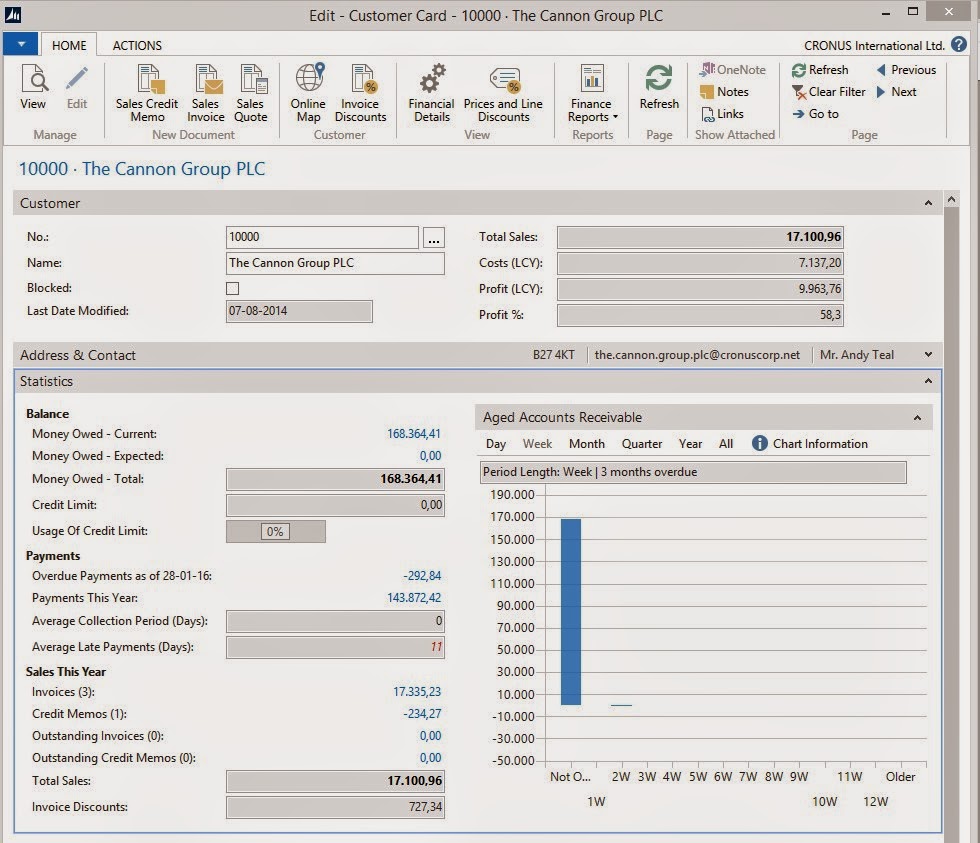
7. KPIs on Master Data Cards.
Hope you find the information useful.
Stay tuned for More about #NAV 2015.
Regards,
Saurav Dhyani
saurav-nav.blogspot.com
While Reading Readiness Document for NAV 2015 i came across some new UI Changes in NAV 2015. Let's see what document says in the article.
What Benefits These Changes Should Bring (AS per Microsoft) -
1. Easier page overview and processing -
By indicating which fields on a page are mandatory, users get a better overview of their process, especially users that do not use the page frequently.
Mandatory Fields will Now be Highlighted in NAV 2015.
2. Faster processing
By auto-filling and hiding No. fields on documents the user can now process documents faster, when that document type has a unique number series. Data entry work becomes faster because some fields can be skipped.
Auto Filling and Hiding Fields on Documents in NAV 2015.
3. Easy check if document is correct
With totals displayed directly on sales and purchase documents, it is now very easy to check if the document lines have been filled as expected. For purchase invoices, this also makes it easier to check totals and VAT amounts.
Totals on Documents.
4. Simpler pages
With the new capabilities to remove UI elements that are not in either the license or in the user’s permission, the individual pages can now be reduced to show only what is really relevant for the user. All UI elements that the user does not need can be removed from the user interface.
Removal of UI Elements based on User Permissions, Showing what is relevant for User.
5. Simplified and Enriched Sales Invoice Experience
Option to Correct / Cancel a Posted Sales Invoice with one Click.
6. Create Customer and Vendor Cards on the Fly.
While Creating a Sales Document for a Non Existance Customer, system will not prompt for Error in NAV 2015 but a window as shown below will appear.
When you select Yes you now will have option to create new Customer Based on Templates already setup in system as per your business.
The Customer will get all the mandatory values from the Template.
** Standard Implemented on customer and vendor cards on selected sales and purchase documents.
7. KPIs on Master Data Cards.
Hope you find the information useful.
Stay tuned for More about #NAV 2015.
Regards,
Saurav Dhyani
saurav-nav.blogspot.com
Comments
Post a Comment